HOW TO CREATE A SUBDOMAIN IN NAMECHEAP CPANEL - NAMECHEAP HOSTING

Learn how to create a subdomain in namecheap control panel
Having a domain for your blog is very useful for your business blog.if you buy a hosting package from any web hosting company and you want to setup different websites with the same hosting without buying another domain name and hosting, you can achieve that by creating a sub domain for your existing domain.
1. Login to your cpanel via www.yourdomain.com/cpanel
Go to domains section and select the sub domain
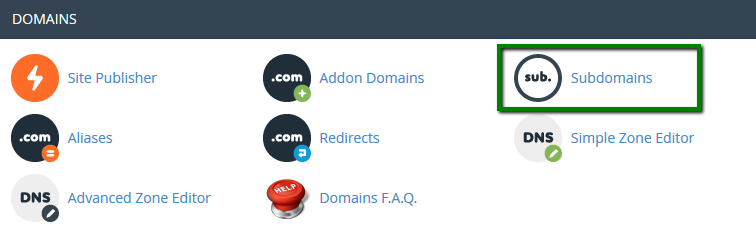
2. Enter the following details for your subdomain:
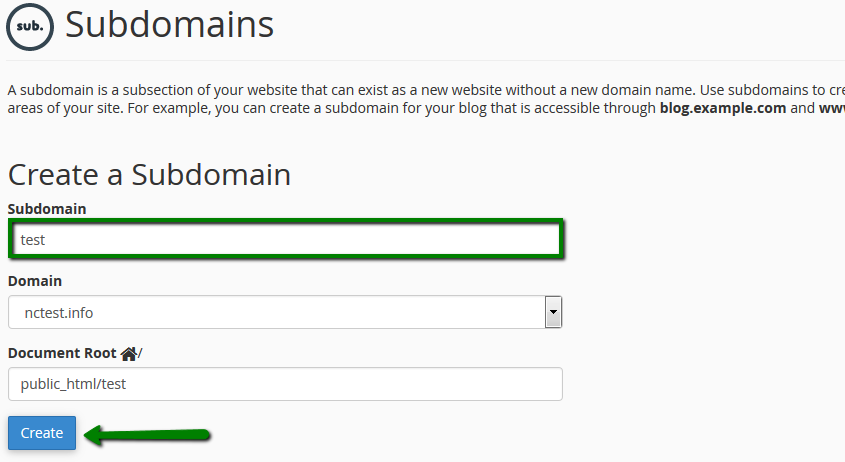
Subdomain: the name of your subdomain
Domain: choose the domain name you wish to create subdomain for from the drop-down menu
Document Root: the root directory for your subdomain (for example, it can be /public_html/subdomain)
3. Click on create
After creating your subdomain, it will not be visible immediately, it will take some hours to be visible.
Conclusion
You do not have to buy domains every time, you can always create a subdomain fro your existing domain name.
Wait, before you continue, join this program that is designed to give you a financial freedom
What is a sub domain
A subdomain is a second website, with its own unique content, but there is no new domain name. It is created from an existing domain name.
How to create a subdomain in Namecheap cpanel
1. Login to your cpanel via www.yourdomain.com/cpanel
Go to domains section and select the sub domain
2. Enter the following details for your subdomain:
Subdomain: the name of your subdomain
Domain: choose the domain name you wish to create subdomain for from the drop-down menu
Document Root: the root directory for your subdomain (for example, it can be /public_html/subdomain)
3. Click on create
After creating your subdomain, it will not be visible immediately, it will take some hours to be visible.
Conclusion
You do not have to buy domains every time, you can always create a subdomain fro your existing domain name.
This is how to create a subdomain in Namecheap.


Thanks for sharing this post. Shared hosting is a way for hosting companies to put a large number of users on the same server. If you are looking for Shared hosting services then Professional Virtual Server Hosting Service in Malaysia is the best.
ReplyDeleteThat is good. Thanks for visiting.
DeleteVery informative post!
ReplyDeleteThanks for visiting and thanks for leaving a comment. Your comment means a lot to us. Thanks once more.
DeleteThis comment has been removed by the author.
ReplyDelete